Thread Rating:
  • 1 Vote(s) - 5 Average
  • 1
  • 2
  • 3
  • 4
  • 5

Outside humidity
#1

Hi,
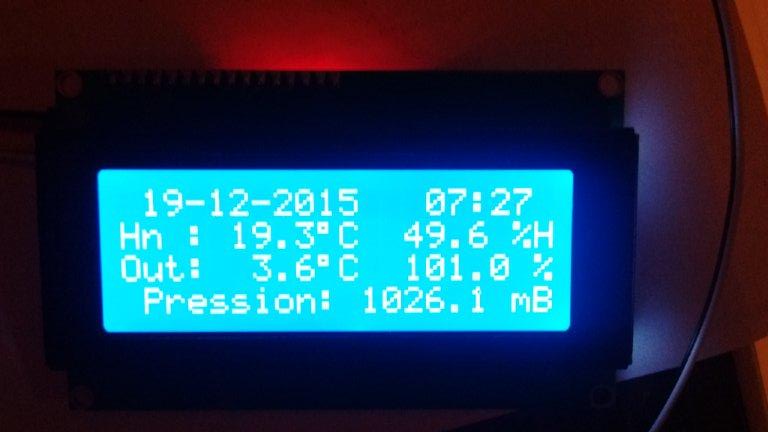
This morning outside humidity was showing 101.0%!!
Sensor is a SHT21.
   
shouldn't be a limitation to 100% somewhere ?
Reply
#2

Hi,

Yes, there should be! Or not... Smile
I'm wondering why the sensor is reading a value greater than 100%?
Implementing a limitation to 100% it's easy, but for now, I think is more important find why the sensor is given a reading like that.
Please report if it happens again. Do you have a picture of your SHT21 sensor? Cable length?

In next software release, I will implement a check to limit the display value to 100%

Reply
#3

SHT21 :    
The cable is a ~9 meter 'Devicenet' cable like this :    
Shield isn't connected for the moment.
the cable will certainly be shorter on the final location.
Reply
#4

Thank you for the pics.

If you need to use a long cable between the sensor and the TX unit, why you haven't chosen a SHT1X family sensor? The SHT2X family sensors use I2C protocol which was designed for communication with very short cables. Hope you have connected the sensor to LI2C port on the TX unit and not simply to the I2C connector. Even using the I2C bus expander chip installed on the TX unit, 9 meters is on the limit of the risk (ideally a second chip should be used at the end of the cable).
We already have talked about this in another topic:
http://www.meteocercal.info/forum/thread...ml#pid3058

As a general advice try to follow this rule: Do your best to use short cables between all the sensors and the TX unit.
Regarding I2C communications, a shielded cable doesn't solve everything, most of the times the problem is the capacitance of the cable which increases with the length.

Reply
#5

This is very strange! I've just noticed that although Cumulus is only showing 100% outdoor humidity, the WeatherDuino RX display is showing 100.4% Sensor is SHT21 connected to the TX by 75cm of cat5 cable.

I've also noticed that instead of the display showing "In" it has "Hn" instead, just as laulau's display in the photo. Strange!!

** Just realised - I guess the H in "Hn" is caused by the extra digit in the humidity reading causing the text to wrap around...??
Reply
#6

Hi AllanG

Although I also use an original SHT21, until laulau described this situation, I was unaware of the possibility of sensor reporting values greater than 100%.
In the coming days will be published a new version of RX and WD software, which in addition to several improvements, will prevent from being shown relative humidity values higher than 100%

Reply
#7

for me, the reading yesterday was only just over 100% - I think the highest it read was 100.5%

I do now have a HTU21 sensor available so as an experiment I may try that and see if it also reads over 100%. Of course I'll need to wait for the right weather conditions to test it....Rolleyes
Reply
#8

A new sensor which though expensive some might want to try,

Http://www.hygrochip.com

Ebay: £45.00; farnell £27.00!!

http://uk.farnell.com/ist-innovative-sen...dp/2191823?ost=Hyt+271&selectedCategoryId=

Also interesting:
http://www.azosensors.com/article.aspx?ArticleID=25
Reply
#9

(27-12-2015, 00:35)Werk_AG Wrote:  Hi AllanG

Although I also use an original SHT21, until laulau described this situation, I was unaware of the possibility of sensor reporting values greater than 100%.
In the coming days will be published a new version of RX and WD software, which in addition to several improvements, will prevent from being shown relative humidity values higher than 100%
Hello,

I am also seeing humidity values over 100%. My current humidity display is 106.1%! The humidity of other stations in the area is currently 95-96%. My station has only been running for about a week and in that time the outside humidity readings have been consistantly high by about 10%. The LCD display shows Hn instead of In.

The humidity sensor is a Davis 7346.166 from a Vanatge Pro 2. I beleive that the sensor is a SHT11. I have used as many parts from the old Davis system as I could. All has worked well other than the high outdoor humidity readings. Is it possible for the sensor to output data higher than 100%?

Other than this small problem, the WeatherDuino works great! Thanks for your hard work.
Reply
#10

Since the user laulau was reported this behaviour with some SHT21 sensor, I'm trying to investigate why this happens. The WeatherDuino Pro2 software does not manipulate the readings of the sensor in anyway, it reads the sensor data via an arduino library, which reads the sensor using the same procedures I found in any available library for the SHT21 (even for other systems like the PI).
Until now, with the sensors I have, I was unsuccessful in trying to reproduce that behaviour. So, where the problem resides?
Sincerely I don't know! But must be something related to the sensor itself.
Regarding to this matter, I just can left some thoughts about some types of sensors labelled as SHT21, that I found on ebay:

Look at this one:

[Image: %24_57.JPG]

Some vendors say that this sensor can be used with 5V power supply.
"Board is 5V tolerant, allowing sensor to run from a 5V supply on Arduino I/O pins"

I doubt! According to Sensirion, the SHT21 power supply range is from 2.1 to 3.6V, so this board can't be used with 5V logic!

Now, see the difference to this one:

[Image: s-l225.jpg]

[Image: s-l225.jpg]

This one have hardware to work with 5V logic, but... is the sensor really an original SHT21 sensor, or at least a first choice part? I can't say it is or not, but at the price level that these sensors are sold, I have my doubts. Only the Sensirion SHT21 sensor costs more than the whole module.

One more:

[Image: s-l500.jpg]

Why this one, even bought in China, costs 4 to 5 times more than the others above?

Just thoughts! Cool

Anyway, trying to minimize the reported situations, the latest WeatherDuino Pro2 software, prevents humidity values above 99.9% .

Reply


Users browsing this thread: 1 Guest(s)