


31-12-2023, 06:11
(This post was last modified: 31-12-2023, 06:29 by Palmyweather.)
This is becoming quite the mystery.
I have attempted again today to get the DHT22 sensors to work including downloading from this forum the software again and ensuring my libraries match.
I have tried 3 different configuration files over two different TX boards which gives me the same results. These are titled:
Main TX:
Ground TX:
Freshly downloaded from the forum configuration:
For reference, I have tested this sensor using TX software build v7.0_b002 on my main board code and existing configuration with the same outcome.
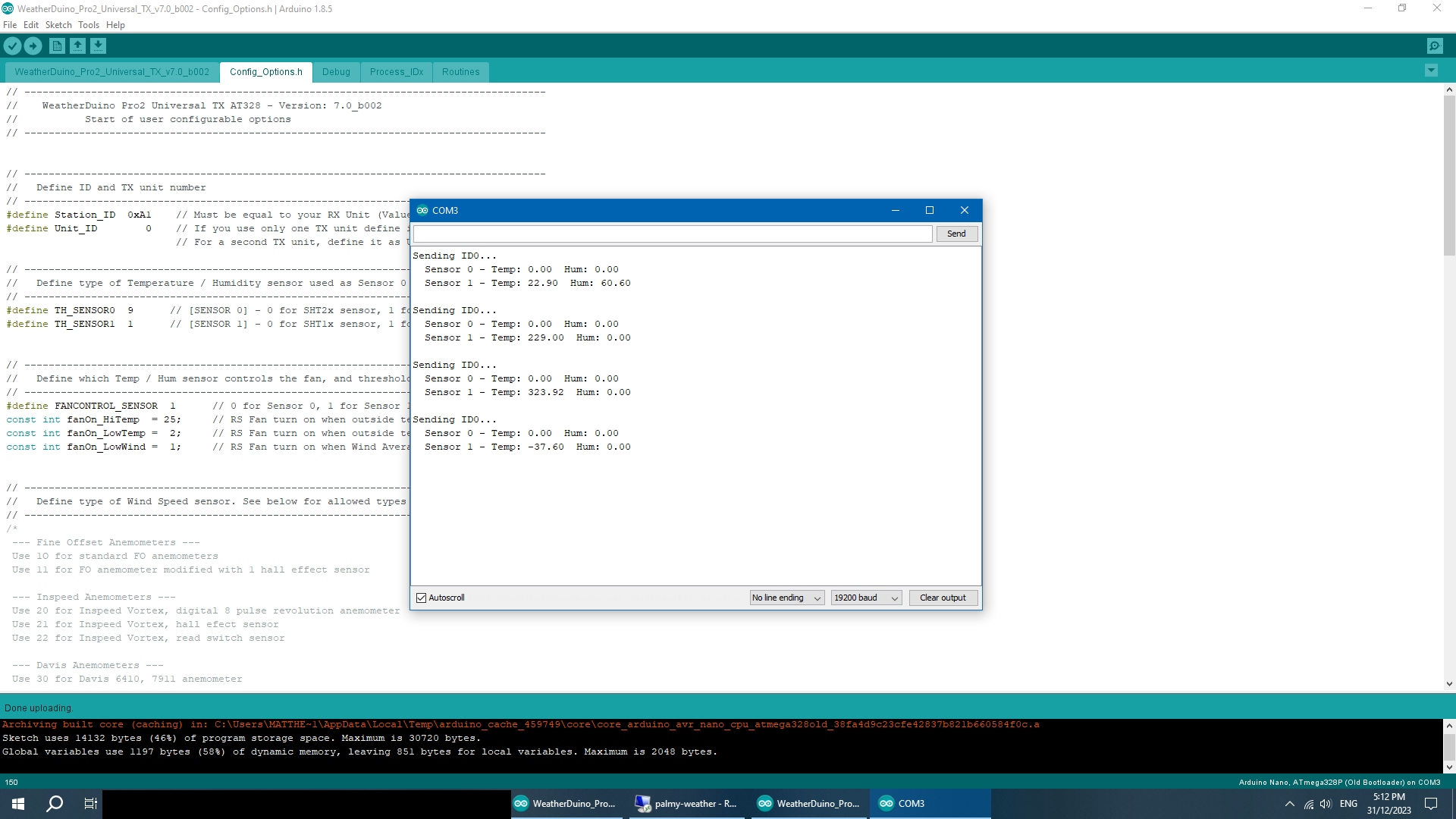
I have attempted again today to get the DHT22 sensors to work including downloading from this forum the software again and ensuring my libraries match.
I have tried 3 different configuration files over two different TX boards which gives me the same results. These are titled:
- Main TX board - my main transmitter unit with wind, rain, UV attached.
- Ground TX board - secondary transmitter with ground and temperature.
- Test configuration - This was a fresh copy of the code downloaded once I started having issues in case any other configuration settings were conflicting.

Main TX:
Code:
// --------------------------------------------------------------------------------------
//    WeatherDuino Pro2 Universal TX AT328 - Version: 7.0_b002
//           Start of user configurable options
// --------------------------------------------------------------------------------------


// --------------------------------------------------------------------------------------
//   Define ID and TX unit number
// --------------------------------------------------------------------------------------
#define Station_ID  0xA1    // Must be equal to your RX Unit (Value from 0x00 to 0xFF)
#define Unit_ID        0    // If you use only one TX unit define it as Unit_ID = 0
                            // For a second TX unit, define it as Unit_ID = 1

// --------------------------------------------------------------------------------------
//   Define type of Temperature / Humidity sensor used as Sensor 0 and / or Sensor 1
// --------------------------------------------------------------------------------------
#define TH_SENSOR0  9      // [SENSOR 0] - 0 for SHT2x sensor, 1 for SHT31 sensor, 2 for HTU21 sensor, 9 for Not Used
#define TH_SENSOR1  1      // [SENSOR 1] - 0 for SHT1x sensor, 1 for DHT22 sensor, 9 for Not Used


// --------------------------------------------------------------------------------------
//   Define which Temp / Hum sensor controls the fan, and threshold values
// --------------------------------------------------------------------------------------
#define FANCONTROL_SENSOR  1      // 0 for Sensor 0, 1 for Sensor 1 (which sensor is used to control the RS Fan)
const int fanOn_HiTemp  = 25;     // RS Fan turn on when outside temperature is >= than this value (ºC)
const int fanOn_LowTemp =  2;     // RS Fan turn on when outside temperature is <= than this value (ºC)
const int fanOn_LowWind =  1;     // RS Fan turn on when Wind Average is <= than this value (m/s)


// --------------------------------------------------------------------------------------
//   Define type of Wind Speed sensor. See below for allowed types
// --------------------------------------------------------------------------------------
/*
 --- Fine Offset Anemometers ---
 Use 1O for standard FO anemometers
 Use 11 for FO anemometer modified with 1 hall effect sensor

 --- Inspeed Anemometers ---
 Use 20 for Inspeed Vortex, digital 8 pulse revolution anemometer
 Use 21 for Inspeed Vortex, hall efect sensor
 Use 22 for Inspeed Vortex, read switch sensor

 --- Davis Anemometers ---
 Use 30 for Davis 6410, 7911 anemometer

 --- Novalynx Anemometers ---
 Use 40 for Novalynx, model 200-WS-02F

 --- Environmental Measurements Limited ---
 Use 50 for EML, model WSD1

 --- Didcot Instrument Company ---
 Use 60 for DIDCOT, model DWR205

 --- Vector Instruments ---
 Use 70 for Vector Instruments model A100LK
 Use 71 for Vector Instruments model A100L2
 Use 72 for Vector Instruments model A100R
*/
#define WINDSPEED_SENSORTYPE 10             // SEE INFO ABOVE!!!


// --------------------------------------------------------------------------------------
//   Define type of Wind Direction sensor
// --------------------------------------------------------------------------------------
/*
 --- Fine Offset Wind Vane ---
 Use 1O for standard FO wind vane

 --- Analogue Wind Vanes ---
 Use 20 for any 5V analogue wind vane. See bellow for a list of tested models

- Inspeed E-Vane 2
- Davis 6410
- Novalynx, model 200-WS-02F
- Environmental Measurements Limited, model model WSD1
- DIDCOT, model DWD205
- Almost all 5V analogue wind vanes will work

*/
#define WINDDIR_SENSORTYPE  10  // SEE INFO ABOVE!!!


// --------------------------------------------------------------------------------------
//          Analogue Vane Offset Calibration
// --------------------------------------------------------------------------------------
const int WDir_offs  = 0;   // Usually there is no need to change default value (zero)


// --------------------------------------------------------------------------------------
//   Define Rain Gauge tip boucket value (mm)
// --------------------------------------------------------------------------------------
/*
  Use 0.280 for standard FineOfset rain gauges (Datasheet value = 0.2794)
  Use 0.200 for standard metric Davis rain gauges
  Use 0.254 for standard imperial Davis rain gauges
*/
#define COLLECTOR_TYPE  0.280  // Please note: Values must be in metric units. Max. resolution: 3 decimal digits


// --------------------------------------------------------------------------------------
//   Define type of UV Sensor
// --------------------------------------------------------------------------------------
#define UV_SENSOR  0      // 0= UVM-30A, 1= VEML6075, 9= Not used


// --------------------------------------------------------------------------------------
//   Soil / Leaf Interface Enable Disable
// --------------------------------------------------------------------------------------
#define SOILLEAF_INTERFACE        0    // 0 = Soil Leaf Interface not used, 1 = Enable Soil Leaf Interface
const byte Number_AnalogSensors = 2;   // Up to 4 analog sensors


// --------------------------------------------------------------------------------------
//   Define which data this unit will send. 0 = Not send this data, 1= Send this data
// --------------------------------------------------------------------------------------
#define ID0  1   // Temp/Hum Data
#define ID1  0   // Not Used
#define ID2  1   // Wind data
#define ID3  1   // Rain data
#define ID4  1   // SolRad / UV data
#define ID5  1   // Hardware Status - System Temp, Battery Voltage etc
#define ID7  0   // Send Soil & Leaf Temperature Data
#define ID9  0   // Send Soil & Leaf Moisture / Wetness Data


// --------------------------------------------------------------------------------------
//   VBat voltage fine tune (values in Volt, positive or negative)
// --------------------------------------------------------------------------------------
#define VBAT_OFFSET    0                  // Ex: 0.1 or -0.2


// *************************************************************************************
//     Hardware Settings
// *************************************************************************************
// Define if the TMP36 sensor is instaled
#define USE_TMP36       1          // 0= Not Instaled, 1= Intalled


// --------------------------------------------------------------------------------------
//   SHT31 I2C Address - Default address will work most of the times!
// --------------------------------------------------------------------------------------
#define SHT31_ADDRESS 0x44           // Default value is 0x44, but it can be changed to 0x45


// --------------------------------------------------------------------------------------
//   Debug
// --------------------------------------------------------------------------------------
#define ENABLE_DEBUG
#define DEBUG_ID0
//#define DEBUG_ID2
//#define DEBUG_ID3
//#define DEBUG_ID4
//#define DEBUG_ID5
//#define DEBUG_SLINTERFACE
//#define EASYWEATHER_TEST


// ---------------------------------------------------------------------------------------------------
//     End of user configurable options
// ---------------------------------------------------------------------------------------------------
Ground TX:
Code:
// --------------------------------------------------------------------------------------
//    WeatherDuino Pro2 Universal TX AT328 - Version: 7.0_b002
//           Start of user configurable options
// --------------------------------------------------------------------------------------


// --------------------------------------------------------------------------------------
//   Define ID and TX unit number
// --------------------------------------------------------------------------------------
#define Station_ID  0xA1    // Must be equal to your RX Unit (Value from 0x00 to 0xFF)
#define Unit_ID        1    // If you use only one TX unit define it as Unit_ID = 0
                            // For a second TX unit, define it as Unit_ID = 1

// --------------------------------------------------------------------------------------
//   Define type of Temperature / Humidity sensor used as Sensor 0 and / or Sensor 1
// --------------------------------------------------------------------------------------
#define TH_SENSOR0  9      // [SENSOR 0] - 0 for SHT2x sensor, 1 for SHT31 sensor, 2 for HTU21 sensor, 9 for Not Used
#define TH_SENSOR1  1      // [SENSOR 1] - 0 for SHT1x sensor, 1 for DHT22 sensor, 9 for Not Used


// --------------------------------------------------------------------------------------
//   Define which Temp / Hum sensor controls the fan, and threshold values
// --------------------------------------------------------------------------------------
#define FANCONTROL_SENSOR  1      // 0 for Sensor 0, 1 for Sensor 1 (which sensor is used to control the RS Fan)
const int fanOn_HiTemp  = 26;     // RS Fan turn on when outside temperature is >= than this value (ºC)
const int fanOn_LowTemp =  2;     // RS Fan turn on when outside temperature is <= than this value (ºC)
const int fanOn_LowWind =  1;     // RS Fan turn on when Wind Average is <= than this value (m/s)


// --------------------------------------------------------------------------------------
//   Define type of Wind Speed sensor. See below for allowed types
// --------------------------------------------------------------------------------------
/*
 --- Fine Offset Anemometers ---
 Use 1O for standard FO anemometers
 Use 11 for FO anemometer modified with 1 hall effect sensor

 --- Inspeed Anemometers ---
 Use 20 for Inspeed Vortex, digital 8 pulse revolution anemometer
 Use 21 for Inspeed Vortex, hall efect sensor
 Use 22 for Inspeed Vortex, read switch sensor

 --- Davis Anemometers ---
 Use 30 for Davis 6410, 7911 anemometer

 --- Novalynx Anemometers ---
 Use 40 for Novalynx, model 200-WS-02F

 --- Environmental Measurements Limited ---
 Use 50 for EML, model WSD1

 --- Didcot Instrument Company ---
 Use 60 for DIDCOT, model DWR205

 --- Vector Instruments ---
 Use 70 for Vector Instruments model A100LK
 Use 71 for Vector Instruments model A100L2
 Use 72 for Vector Instruments model A100R
*/
#define WINDSPEED_SENSORTYPE 10             // SEE INFO ABOVE!!!


// --------------------------------------------------------------------------------------
//   Define type of Wind Direction sensor
// --------------------------------------------------------------------------------------
/*
 --- Fine Offset Wind Vane ---
 Use 1O for standard FO wind vane

 --- Analogue Wind Vanes ---
 Use 20 for any 5V analogue wind vane. See bellow for a list of tested models

- Inspeed E-Vane 2
- Davis 6410
- Novalynx, model 200-WS-02F
- Environmental Measurements Limited, model model WSD1
- DIDCOT, model DWD205
- Almost all 5V analogue wind vanes will work

*/
#define WINDDIR_SENSORTYPE  10  // SEE INFO ABOVE!!!


// --------------------------------------------------------------------------------------
//          Analogue Vane Offset Calibration
// --------------------------------------------------------------------------------------
const int WDir_offs  = 0;   // Usually there is no need to change default value (zero)


// --------------------------------------------------------------------------------------
//   Define Rain Gauge tip boucket value (mm)
// --------------------------------------------------------------------------------------
/*
  Use 0.280 for standard FineOfset rain gauges (Datasheet value = 0.2794)
  Use 0.200 for standard metric Davis rain gauges
  Use 0.254 for standard imperial Davis rain gauges
*/
#define COLLECTOR_TYPE  0.280  // Please note: Values must be in metric units. Max. resolution: 3 decimal digits


// --------------------------------------------------------------------------------------
//   Define type of UV Sensor
// --------------------------------------------------------------------------------------
#define UV_SENSOR  9      // 0= UVM-30A, 1= VEML6075, 9= Not used


// --------------------------------------------------------------------------------------
//   Soil / Leaf Interface Enable Disable
// --------------------------------------------------------------------------------------
#define SOILLEAF_INTERFACE        1    // 0 = Soil Leaf Interface not used, 1 = Enable Soil Leaf Interface
const byte Number_AnalogSensors = 4;   // Up to 4 analog sensors


// --------------------------------------------------------------------------------------
//   Define which data this unit will send. 0 = Not send this data, 1= Send this data
// --------------------------------------------------------------------------------------
#define ID0  1   // Temp/Hum Data
#define ID1  0   // Not Used
#define ID2  0   // Wind data
#define ID3  0   // Rain data
#define ID4  0   // SolRad / UV data
#define ID5  1   // Hardware Status - System Temp, Battery Voltage etc
#define ID7  1   // Send Soil & Leaf Temperature Data
#define ID9  1   // Send Soil & Leaf Moisture / Wetness Data


// --------------------------------------------------------------------------------------
//   VBat voltage fine tune (values in Volt, positive or negative)
// --------------------------------------------------------------------------------------
#define VBAT_OFFSET    0.8                  // Ex: 0.1 or -0.2


// *************************************************************************************
//     Hardware Settings
// *************************************************************************************
// Define if the TMP36 sensor is instaled
#define USE_TMP36       1          // 0= Not Instaled, 1= Intalled


// --------------------------------------------------------------------------------------
//   SHT31 I2C Address - Default address will work most of the times!
// --------------------------------------------------------------------------------------
#define SHT31_ADDRESS 0x44           // Default value is 0x44, but it can be changed to 0x45


// --------------------------------------------------------------------------------------
//   Debug
// --------------------------------------------------------------------------------------
#define ENABLE_DEBUG
#define DEBUG_ID0
//#define DEBUG_ID2
//#define DEBUG_ID3
//#define DEBUG_ID4
//#define DEBUG_ID5
//#define DEBUG_SLINTERFACE
//#define EASYWEATHER_TEST


// ---------------------------------------------------------------------------------------------------
//     End of user configurable options
// ---------------------------------------------------------------------------------------------------
Freshly downloaded from the forum configuration:
Code:
// --------------------------------------------------------------------------------------
//    WeatherDuino Pro2 Universal TX AT328 - Version: 7.0_b003
//           Start of user configurable options
// --------------------------------------------------------------------------------------


// --------------------------------------------------------------------------------------
//   Define ID and TX unit number
// --------------------------------------------------------------------------------------
#define Station_ID  0xA1    // Must be equal to your RX Unit (Value from 0x00 to 0xFF)
#define Unit_ID        1    // If you use only one TX unit define it as Unit_ID = 0
                            // For a second TX unit, define it as Unit_ID = 1

// --------------------------------------------------------------------------------------
//   Define type of Temperature / Humidity sensor used as Sensor 0 and / or Sensor 1
// --------------------------------------------------------------------------------------
#define TH_SENSOR0  9      // [SENSOR 0] - 0 for SHT2x sensor, 1 for SHT31 sensor, 2 for HTU21 sensor, 9 for Not Used
#define TH_SENSOR1  1      // [SENSOR 1] - 0 for SHT1x sensor, 1 for DHT22 sensor, 9 for Not Used


// --------------------------------------------------------------------------------------
//   Define which Temp / Hum sensor controls the RS fan, and threshold values
// --------------------------------------------------------------------------------------
#define FANCONTROL_SENSOR  0      // 0 for Sensor 0, 1 for Sensor 1 (which sensor is used to control the RS Fan)
const int fanOn_HiTemp  =  19;     // RS Fan turn on when outside temperature is >= than this value (ºC)
const int fanOn_LowTemp =  2;     // RS Fan turn on when outside temperature is <= than this value (ºC)
const int fanOn_LowWind =  1;     // RS Fan turn on when Wind Average is <= than this value (m/s)


// --------------------------------------------------------------------------------------
//   Define type of Wind Speed sensor. See below for allowed types
// --------------------------------------------------------------------------------------
/*
 --- Fine Offset Anemometers ---
 Use 1O for standard FO anemometers
 Use 11 for FO anemometer modified with 1 hall effect sensor

 --- Inspeed Anemometers ---
 Use 20 for Inspeed Vortex, digital 8 pulse revolution anemometer
 Use 21 for Inspeed Vortex, hall efect sensor
 Use 22 for Inspeed Vortex, read switch sensor

 --- Davis Anemometers ---
 Use 30 for Davis 6410, 7911 anemometer

 --- Novalynx Anemometers ---
 Use 40 for Novalynx, model 200-WS-02F

 --- Environmental Measurements Limited ---
 Use 50 for EML, model WSD1

 --- Didcot Instrument Company ---
 Use 60 for DIDCOT, model DWR205

 --- Vector Instruments ---
 Use 70 for Vector Instruments model A100LK
 Use 71 for Vector Instruments model A100L2
 Use 72 for Vector Instruments model A100R
*/
#define WINDSPEED_SENSORTYPE 10             // SEE INFO ABOVE!!!


// --------------------------------------------------------------------------------------
//   Define type of Wind Direction sensor
// --------------------------------------------------------------------------------------
/*
 --- Fine Offset Wind Vane ---
 Use 1O for standard FO wind vane

 --- Analogue Wind Vanes ---
 Use 20 for any 5V analogue wind vane. See bellow for a list of tested models

- Inspeed E-Vane 2
- Davis 6410
- Novalynx, model 200-WS-02F
- Environmental Measurements Limited, model model WSD1
- DIDCOT, model DWD205
- Almost all 5V analogue wind vanes will work

*/
#define WINDDIR_SENSORTYPE  10  // SEE INFO ABOVE!!!


// --------------------------------------------------------------------------------------
//          Analogue Vane Offset Calibration
// --------------------------------------------------------------------------------------
const int WDir_offs  = 0;   // Usually there is no need to change default value (zero)


// --------------------------------------------------------------------------------------
//   Define Rain Gauge tip boucket value (mm)
// --------------------------------------------------------------------------------------
/*
  Use 0.280 for standard FineOfset rain gauges (Datasheet value = 0.2794)
  Use 0.200 for standard metric Davis rain gauges
  Use 0.254 for standard imperial Davis rain gauges
*/
#define COLLECTOR_TYPE  0.280  // Please note: Values must be in metric units. Max. resolution: 3 decimal digits


// --------------------------------------------------------------------------------------
//   Define type of UV Sensor
// --------------------------------------------------------------------------------------
#define UV_SENSOR  9      // 0= UVM-30A, 1= VEML6075, 9= Not used


// --------------------------------------------------------------------------------------
//   Soil / Leaf Interface Enable Disable
// --------------------------------------------------------------------------------------
#define SOILLEAF_INTERFACE        0    // 0 = Soil Leaf Interface not used, 1 = Enable Soil Leaf Interface
const byte Number_AnalogSensors = 2;   // Up to 4 analog sensors


// --------------------------------------------------------------------------------------
//   Define which data this unit will send. 0 = Not send this data, 1= Send this data
// --------------------------------------------------------------------------------------
#define ID0  1   // Temp/Hum Data
#define ID1  0   // Not Used
#define ID2  1   // Wind data
#define ID3  1   // Rain data
#define ID4  0   // SolRad / UV data
#define ID5  1   // Hardware Status - System Temp, Battery Voltage etc
#define ID7  0   // Send Soil & Leaf Temperature Data
#define ID9  0   // Send Soil & Leaf Moisture / Wetness Data


// --------------------------------------------------------------------------------------
//   VBat voltage fine tune (values in Volt, positive or negative)
// --------------------------------------------------------------------------------------
#define VBAT_OFFSET    0.0                  //


// *************************************************************************************
//     Hardware Settings
// *************************************************************************************
// Define if the TMP36 sensor is instaled
#define USE_TMP36       0          // 0= Not Instaled, 1= Intalled


// --------------------------------------------------------------------------------------
//   SHT31 I2C Address - Default address will work most of the times!
// --------------------------------------------------------------------------------------
#define SHT31_ADDRESS 0x44           // Default value is 0x44, but it can be changed to 0x45


// --------------------------------------------------------------------------------------
//   Debug
// --------------------------------------------------------------------------------------
#define ENABLE_DEBUG
#define DEBUG_ID0
//#define DEBUG_ID2
//#define DEBUG_ID3
//#define DEBUG_ID4
//#define DEBUG_ID5
//#define DEBUG_SLINTERFACE
//#define EASYWEATHER_TEST


// ---------------------------------------------------------------------------------------------------
//     End of user configurable options
// ---------------------------------------------------------------------------------------------------
For reference, I have tested this sensor using TX software build v7.0_b002 on my main board code and existing configuration with the same outcome.

