


13-05-2016, 10:30
It has been just over a month and a half since version 2 of WeatherDuino Pro2 Software was released with some cool new features. One of these new features is called "GPO", General Purpose Output. It allows preset conditions to be programmed into the receiver's software and when met, provide an output to drive a relay or similar.
It is a great way to get creative and experience working with code.
So, what have you done?
For me, I wanted to monitor my transmitter battery voltage to ensure that everything continues to run smoothly especially as winter is fast approaching. So I have installed four 3mm LED's in between the LCD display and the front of the box. When the right conditions are met, these LED's will come on and illuminate the LCD screen in a bright red colour to draw my attention to it.
These LED's are powered directly from the RX board from the GPO output. I have ensured this load does not exceed more than 60 mA (the maximum recommendation for this output).
I developed this in two stages: First stage will flash the LED's on and off at a preset TX voltage once every minute and change the text on the LCD screen. When it drops below a second preset TX voltage, the LED's will stay on permanently until the TX voltage returns above the preset values.
If you wanted to do something similar without adding the 3mm LEDs, you could also try simply toggling the LCD screen on and off with something like:
BackLight_State = !BackLight_State; lcd.setBacklight(BackLight_State);
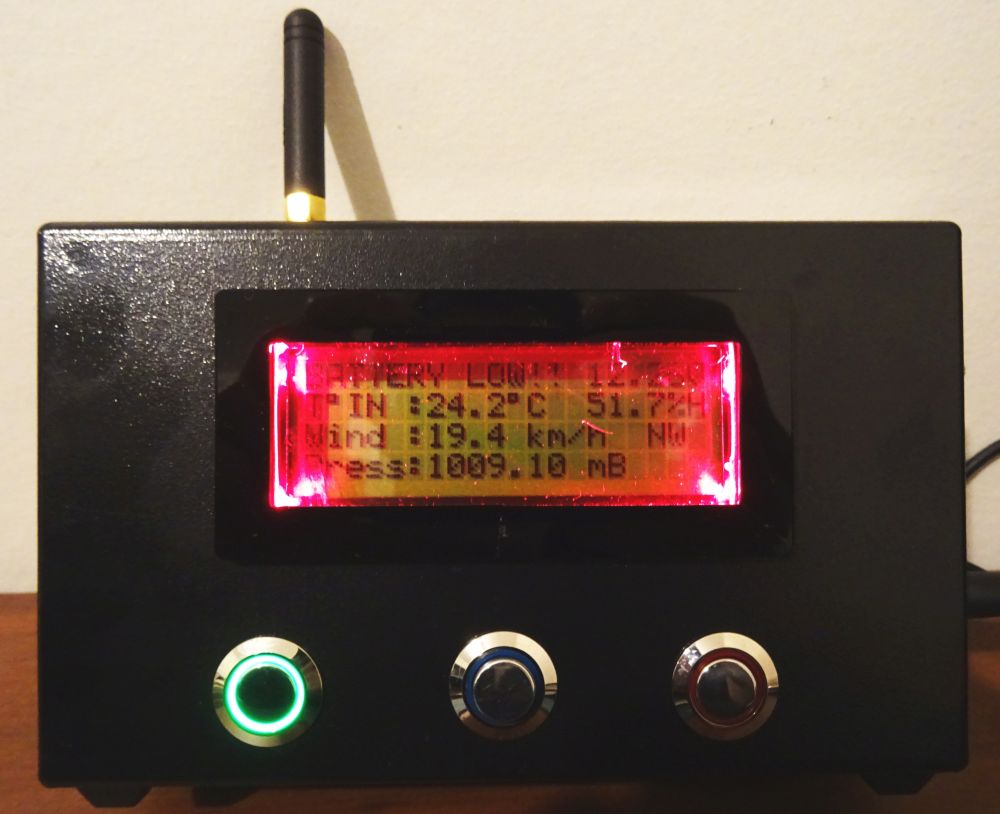 The photo does not really represent this the best, but I am sure it shows the idea/concept. The text where the date and time would normally be displayed has been replaced with the battery voltage. When I redesign my RX enclosure, I will attempt to recess the LED's better.
So the challenge: What have you done with your GPO feature in Version 2 of WeatherDuino Pro2 Software? Lets get creative!
More information about the GPO feature can be found on this forum here:
http://www.meteocercal.info/forum/Thread...ve-a-relay
It is a great way to get creative and experience working with code.
So, what have you done?
For me, I wanted to monitor my transmitter battery voltage to ensure that everything continues to run smoothly especially as winter is fast approaching. So I have installed four 3mm LED's in between the LCD display and the front of the box. When the right conditions are met, these LED's will come on and illuminate the LCD screen in a bright red colour to draw my attention to it.
These LED's are powered directly from the RX board from the GPO output. I have ensured this load does not exceed more than 60 mA (the maximum recommendation for this output).
I developed this in two stages: First stage will flash the LED's on and off at a preset TX voltage once every minute and change the text on the LCD screen. When it drops below a second preset TX voltage, the LED's will stay on permanently until the TX voltage returns above the preset values.
Code:
GPO_state = 0;
//Check the TX battery voltage for set values. This value will leave LEDs on

if ((Unit[0].BatVolt / 100.0) <= 12.0 && (Unit[0].BatVolt / 100.0) != 0 )
{
setPortHIGH(PORTD, 3); //Turn on the GPO pin
lcd.setCursor(0, 0); //Set cursor to top row (over write date/time)
lcd.print(F("BATTERY LOW!! ")); // Print battery warning text
lcd.print(Unit[0].BatVolt / 100.0, 2); // Print battery voltage
lcd.print(F("V"));
GPO_state = 1;
}

//Check the TX battery voltage for set values. This value will flash LEDs on and off (pre low warning)

else if ((Unit[0].BatVolt / 100.0) <= 12.05 && (Unit[0].BatVolt / 100.0) != 0 )
{
setPortHIGH(PORTD, 3); //Turn on the GPO pin
lcd.setCursor(0, 0); //Set cursor to top row (over write date/time)
lcd.print(F("BATTERY LOW!! ")); // Print battery warning text
lcd.print(Unit[0].BatVolt / 100.0, 2); // Print battery voltage
lcd.print(F("V"));
setPortLOW(PORTD, 3); //Turn off the GPO pin (looks like a flash of light)
GPO_state = 1;
}

else setPortLOW(PORTD, 3); //Keep LEDs off
If you wanted to do something similar without adding the 3mm LEDs, you could also try simply toggling the LCD screen on and off with something like:
BackLight_State = !BackLight_State; lcd.setBacklight(BackLight_State);
So the challenge: What have you done with your GPO feature in Version 2 of WeatherDuino Pro2 Software? Lets get creative!
More information about the GPO feature can be found on this forum here:
http://www.meteocercal.info/forum/Thread...ve-a-relay

