


10-11-2022, 17:28
Hi friends
I have a minor problem.
with the option "true" display imperial units
I keep getting temperature in F
no one knows why this is happening
Thank you Ondra
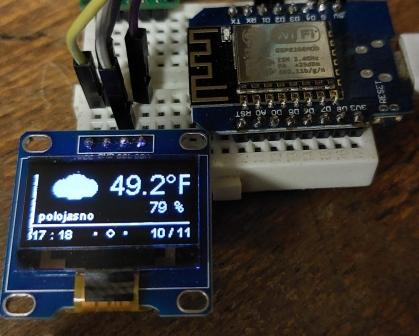
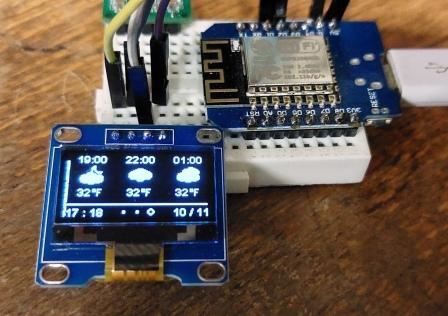
I have a minor problem.
with the option "true" display imperial units
I keep getting temperature in F
no one knows why this is happening
Thank you Ondra
PHP Code:
// --------------------------------------------------------------------------------------
//        WeatherCube - MiniWD ESP8266_v1.0_b004
//         Start of user configurable options
// --------------------------------------------------------------------------------------

// --------------------------------------------------------------------------------------
//   WiFi Credentials
// --------------------------------------------------------------------------------------
const char* WIFI_SSID     = "......";
const char* WIFI_PASSWORD = "aabb";


//---------------------------------------------------------
// Define Timezone and rules for auto Summer Time clock adjust
// Use POSIX standard format
//
// Examples:
// In North American Eastern Standard Time (EST) and Eastern Daylight Time (EDT), the normal offset from UTC is 5 hours.
// Since this is west of the prime meridian, the sign is positive (+5 = 5).
// Summer time begins on March’s second Sunday at 2:00am, and ends on November’s first Sunday at 2:00am.
//       TZ_info = "EST+5EDT,M3.2.0/2,M11.1.0/2"
//
// Western Greenland Time (WGT) and Western Greenland Summer Time (WGST) are 3 hours behind UTC in the winter.
// Its clocks follow the European Union rules of springing forward by one hour on March’s last Sunday at 01:00 UTC (-02:00 local time)
// and falling back on October’s last Sunday at 01:00 UTC (-01:00 local time).
//       TZ_info = "WGT3WGST,M3.5.0/-2,M10.5.0/-1"
//---------------------------------------------------------

//const char* TZ_info = "GMT0BST,M3.5.0/01,M10.5.0/02";                   // --> British Time Zone
//const char* TZ_info = "CEST-1CET,M3.2.0/2:00:00,M11.1.0/2:00:00";       // --> Germany Time Zone
//const char* TZ_info = "CET-1CEST,M3.5.0/2,M10.5.0/3";                   // --> France Timezone
//const char* TZ_info = "AZOT1AZOST,M3.5.0/01:00:00,M10.5.0/02:00:00";    // --> Açores, Portugal Time Zone

//const char* TZ_info = "WET0WEST,M3.5.0/01:00:00,M10.5.0/02:00:00";        // --> Portugal Time Zone
   const char* TZ_info = "CEST-1CET,M3.5.0/2:00:00,M10.5.0/3:00:00";        //  CZ


// --------------------------------------------------------------------------------------
//   OpenWeatherMap Settings
//   You need to have an OpenWeather API Key.
//   If you don't have one, sign up for an account at OpenWeather to get your free API Key.
// --------------------------------------------------------------------------------------
String OPEN_WEATHER_MAP_APP_ID = "2ee972";

/*
Go to https://openweathermap.org/find?q= and search for a location. Go through the
result set and select the entry closest to the actual location you want to display
data for. It'll be a URL like https://openweathermap.org/city/2657896. The number
at the end is what you assign to the constant below.
*/

#define OPEN_WEATHER_LOCATION_MODE  1      //  1= By LOCATION_ID, 2= By LOCATION_NAME, 3= By LOCATION_LATITUDE & LOCATION_LONGITUDE

// Fill if chosen By LOCATION_ID
String OPEN_WEATHER_MAP_LOCATION_ID        = "3067421";

// Fill if chosen By LOCATION_NAME
String OPEN_WEATHER_MAP_LOCATION_NAME      = "Prostějov, CZ";

// Fill if chosen By LOCATION_LATITUDE & LOCATION_LONGITUDE
String OPEN_WEATHER_MAP_LOCATION_LATITUDE  = "49.47222";
String OPEN_WEATHER_MAP_LOCATION_LONGITUDE = "17.11055";


// --------------------------------------------------------------------------------------
//   Pick a language code from this list:
//
//   Arabic - ar, Bulgarian - bg, Catalan - ca, Czech - cz, German - de, Greek - el,
//   English - en, Persian (Farsi) - fa, Finnish - fi, French - fr, Galician - gl,
//   Croatian - hr, Hungarian - hu, Italian - it, Japanese - ja, Korean - kr,
//   Latvian - la, Lithuanian - lt, Macedonian - mk, Dutch - nl, Polish - pl,
//   Portuguese - pt, Romanian - ro, Russian - ru, Swedish - se, Slovak - sk,
//   Slovenian - sl, Spanish - es, Turkish - tr, Ukrainian - ua, Vietnamese - vi,
//   Chinese Simplified - zh_cn, Chinese Traditional - zh_tw.
// --------------------------------------------------------------------------------------
String OPEN_WEATHER_MAP_LANGUAGE = "cz";


// --------------------------------------------------------------------------------------
//   Define Units
//   This setting define the units shown on the display when the Weather Cube is working in stand alone mode.
//   When the Weather Cube is set to get data from an WeatherDuino receiver,
//   the units shown on the OLED display will be the same used on the receiver.
//   This means this setting have no effect when GET_WEATHERDUINO_DATA is set to 1
// --------------------------------------------------------------------------------------
    const boolean IS_METRIC = true ;   // true= Metric Units, false= Imperial units


// --------------------------------------------------------------------------------------
//   Edit according to your language
// --------------------------------------------------------------------------------------

//  PT Language example
//const String WDAY_NAMES[]  = {"Dom", "Seg", "Ter", "Qua", "Qui", "Sex", "Sab"};
//const String MONTH_NAMES[] = {"JAN", "FEV", "MAR", "ABR", "MAI", "JUN", "JUL", "AGO", "SET", "OUT", "NOV", "DEZ"};
//const char* vaneDirectionsText[] = {"N", "NNE", "NE", "ENE", "E", "ESE", "SE", "SSE", "S", "SSO", "SO", "OSO", "O", "ONO", "NO", "NNO"};

//  GB Language
const String WDAY_NAMES[]  = {"NE", "PO", "UT", "ST", "CT", "PA", "SO"};
const String MONTH_NAMES[] = {"JAN", "FEB", "MAR", "APR", "MAY", "JUN", "JUL", "AUG", "SEP", "OCT", "NOV", "DEC"};
const char* vaneDirectionsText[] = {"N", "NNE", "NE", "ENE", "E", "ESE", "SE", "SSE", "S", "SSW", "SW", "WSW", "W", "WNW", "NW", "NNW"};


// --------------------------------------------------------------------------------------
//   Settings to enable receive data from an existing WeatherDuino Weather Station
//   Enable only if you have an WeatherDuino Weather Station with the Broadcast Data function active
// --------------------------------------------------------------------------------------
#define GET_WEATHERDUINO_DATA 0   // 0= No, 1= Yes

  // --------------------------------------------------------------------------------------
  //   Port to listen for WeatherDuino UDP data packets.
  //   Use the same port defined on the WeatherDuino receiver software (UDP_BROADCAST_PORT)
  // --------------------------------------------------------------------------------------
  #define UDP_DATA_PORT  9889

  // --------------------------------------------------------------------------------------
  //   Relay_ID should be equal to the value set in the WeatherDuino receiver which is broadcasting data
  // --------------------------------------------------------------------------------------
  const byte Relay_ID = 0xA3;


// ---------------------------------------------------------------------------------------------------
//     End of user configurable options
// ---------------------------------------------------------------------------------------------------

// --------------------------------------------------------------------------------------
//   Debug helper - Prints debug messages to serial monitor
// --------------------------------------------------------------------------------------
//#define PRINT_DEBUG_RX_MESSAGES
//#define PRINT_DEBUG_WIFI_MESSAGES