Thread Rating:
  • 2 Vote(s) - 5 Average
  • 1
  • 2
  • 3
  • 4
  • 5

Another Oz build
#21

Okay, thanks for that Werk_AG. That helps a lot. I'm still keen to get something sorted though. You mentioned a few posts up that I could use the ADC pin used by the solar sensor to read a 0-5V proportional input. Which one is the ADC pin? Is it A0 or A1? I'm out of my depth here. Could I continue to use my Windows PC to calculate the water tank level and incorporate one of these DAC's https://www.adafruit.com/products/935?gc...fgodr4gAog to feed a 0-5V signal to the ADC pin? The TX unit is in the same room as the PC (the TX unit is on the window sill of a dormer style window and the leads go out through the roof cavity to the sensors on the roof, so connecting the PC and TX unit is quite simple).
Reply
#22
Photo 

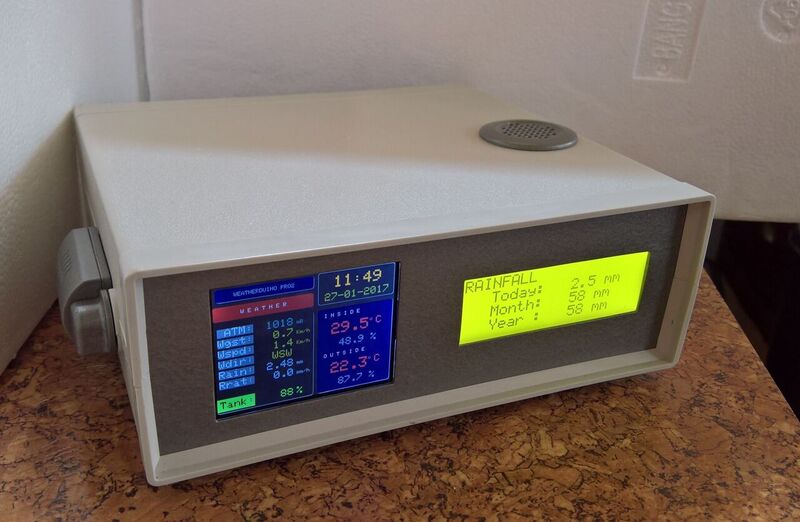
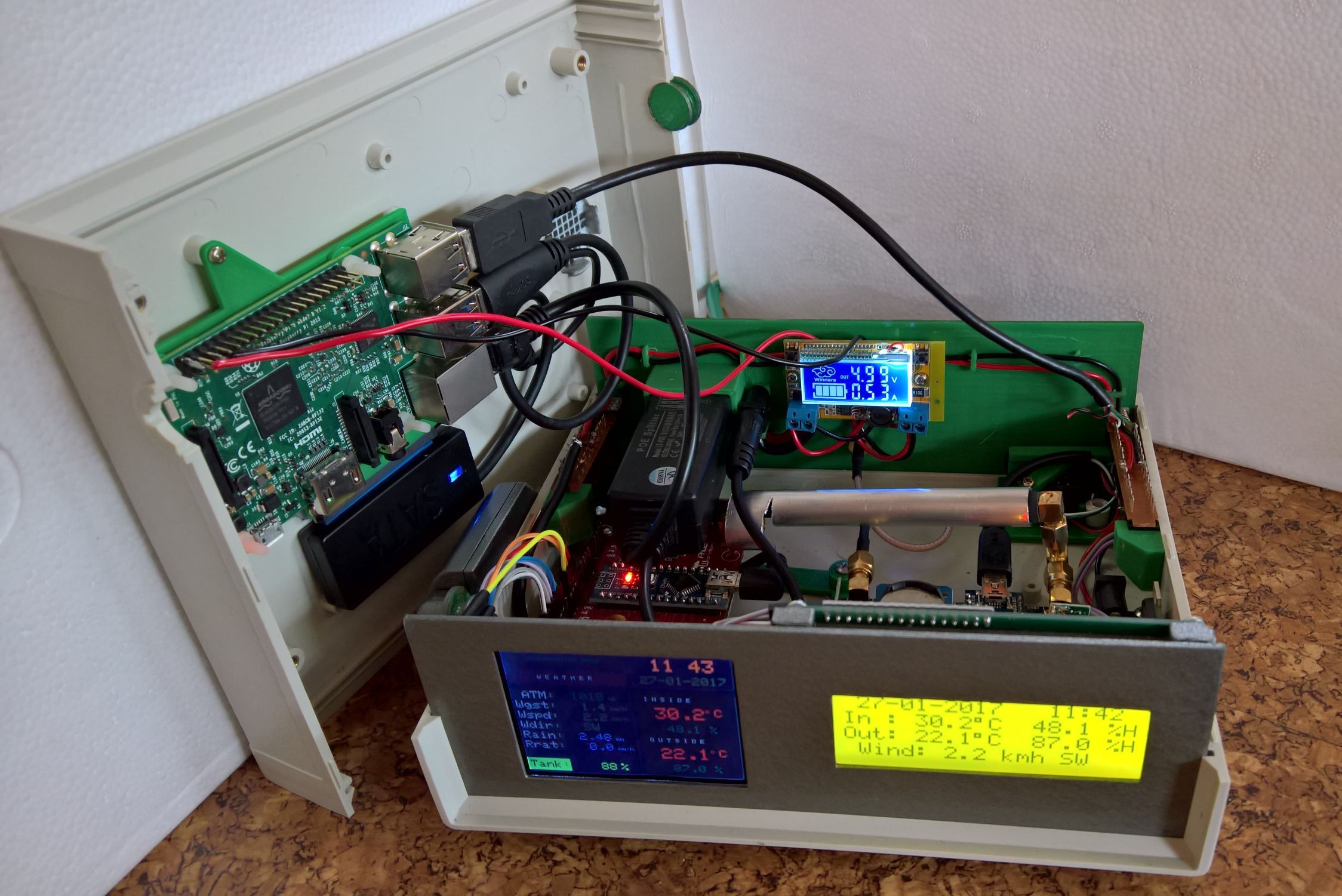
I know I'm well overdue for a progress report but I've only just recently finalised boxing everything up completely. The WeatherDuino Pro2 has been operating for months. I've had various interruptions with work, there have been hold-ups due to the ebay snail mail and things also slowed because I made regular decision changes on how I would put it all together. From a very early stage (basically when I ordered the initial boards) I knew that the RX and WD units would essentially sit beside each other, so in the end I decided to just mount them within the same enclosure. Things grew from there and the enclosure now holds the RX unit, the WD unit, as well as the RPi3 (and SSD). Everything worked fine whilst the enclosure was open (with the 2 halves sitting beside each other) and was still fine until the two halves were closed to within about 5mm. Once the final closure happened though, there was a problem with the signal transmission between the RX and WD units. I put this down to interference so tried a small shield made out of a piece of aluminium tube. That did the trick and now everything works fine.

The whole unit is powered by PoE (the 48V version, not the earlier 24V version). That makes things easy to manage at the back end of the enclosure.

https://www.dropbox.com/s/who0cz2xeajoof...w.jpg?dl=0
   

https://www.dropbox.com/s/nm577pjrj70vks...w.jpg?dl=0
   

https://www.dropbox.com/s/p8mofgfnhjp2hf...w.jpg?dl=0


As I'd mentioned earlier, rainfall reporting was very important to me, whereas solar radiation and UV weren't really important to me. So I modified the code (with help) to show the level of our home water tanks (we don't have access to town water). The tank level shows in the bottom left hand corner of the WD screen. The tank label and value are colour-coded (green for 75 - 100%, yellow for 50 - 75%, orange for 25 - 50%, and red for 0 - 25%). I travel a bit for work and I'm the only one in the family that keeps an eye on the water levels. So now I can easily check the tank levels from wherever I am in the world and if the tanks get very low, I can organise for a water tanker to bring a load of water and top the tanks up before we run completely dry. The vast majority of the time though, rainfall is sufficient to keep the tanks at an acceptable level.

The LCD screen cycles between the rainfall reporting and the standard display.
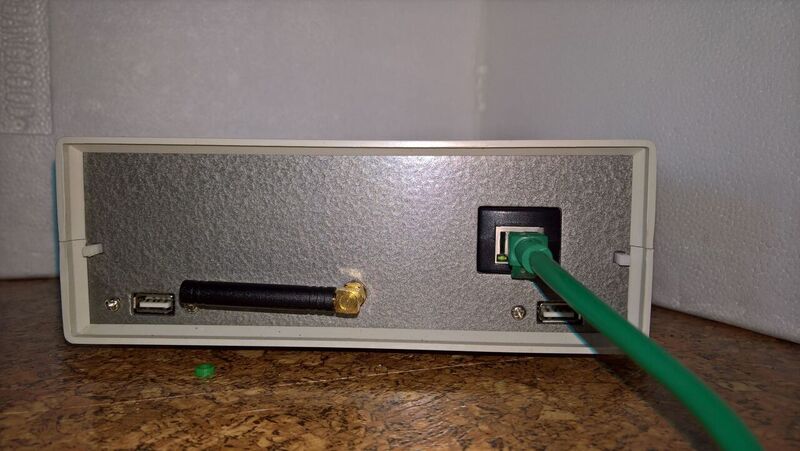
You might notice the usb ports and 2 nylon buttons on the rear panel of the enclosure. I've set it up so that you can plug a usb lead into the relevant usb port, push the button, and then the RX or WD unit is ready to have a sketch uploaded to it. That saves opening the box. The switches (a 6PDT for the WD unit and an 8PDT for the RX unit) swap all the power and data connections between standard operation and the usb port, as required. The RX unit switch also opens the jumper (VP1?).

I've also set up a web site if anyone is interested.

It's been a great learning experience and good fun as well. Thanks to Werk_AG for making it all possible and providing the flexibility and assistance to get us all up and running with such a great project.
Reply
#23

When I read "From a very early stage (basically when I ordered the initial boards) I knew that the RX and WD units would essentially sit beside each other", I got a bad feeling... Oh no, the TX module on the receiver unit will be too close to the RX module of the WD unit, this will not work I thought. You found a solution, in the hard way. There is a little and easy trick to do what you want... I will talk about it later.

Very ingenious construction. For me, its very rewarding seeing how each one is able to customize this project to meet their needs and personal taste.

Congratulations. I'm delighted by seeing that your idea of integrating the water level sensor on the project is working.

Thank you for all.

Reply
#24
Thumbs Up 

(27-01-2017, 03:51)spudstrawb Wrote:  I've also set up a web site if anyone is interested.

It's been a great learning experience and good fun as well. Thanks to Werk_AG for making it all possible and providing the flexibility and assistance to get us all up and running with such a great project.

Congratulations!

Very nice project and very good job.  Smile

Best Regards
Zdenek

Best Regards
Zdenek

Brandys/L Weather
Reply
#25

Awesome stuff, and thanks for the update.. Really nice work spuds..!!!! Love the way the RX case turned out, that's really, really nice.. I like that a lot....

Mark R
Reply
#26

(27-01-2017, 03:51)spudstrawb Wrote:  ... Everything worked fine whilst the enclosure was open (with the 2 halves sitting beside each other) and was still fine until the two halves were closed to within about 5mm. Once the final closure happened though, there was a problem with the signal transmission between the RX and WD units. I put this down to interference so tried a small shield made out of a piece of aluminium tube. That did the trick and now everything works fine.

You never talked about your intention to have the two units working side by side ...

So, and for everyone which wants to have a Wireless Display unit working very close or side by side with a Pro2 receiver, here is a small and easy trick:

Don't install the RX module in the Wireless Display unit, instead, just connect a single wire from the TX Dat pin of the Pro2 receiver to the RX Dat pin of the Wireless Display unit.
Of course we should have a common GND between the two boards (don't use the GND pin of the TX module for this)
Configure the software normally, setting the same Relay_ID on both units, and that's all.


If there is no intention of Broadcast data to other Wireless Display units, the TX module on the Pro2 receiver can even be removed or not used.

WeatherDuino secrets!  Smile  Smile  Smile

Reply
#27

(28-01-2017, 02:24)Werk_AG Wrote:  
You never talked about your intention to have the two units working side by side ...

You never asked ... (I'm just joking).  Wink


Werk_AG
So, and for everyone which wants to have a Wireless Display unit working very close or side by side with a Pro2 receiver, here is a small and easy trick: 


I might give it a try. There is always merit in simplicity. So I connect Pin 2 of the TX unit on the RX board (that's the 3rd pin from the 9V socket end of the TX unit?) to Pin 2 of the RX unit on the WD board (that's the one labelled "Dat" - the 2nd one from the top of the board?). See sketch attached/below for my understanding.

https://www.dropbox.com/s/5sz9it9ox8wtmq...s.jpg?dl=0

You say "don't use the GND pin of the TX module" for the common GND. So is the arrangement shown in the sketch in green okay?
Reply
#28

My congratulations too, an excellent piece of construction.
A couple of questions if you don't mind
Who did your web site and what brand is the instrument case, looks excellent quality
Jim
Reply
#29

(28-01-2017, 07:40)spudstrawb Wrote:  I might give it a try. There is always merit in simplicity. So I connect Pin 2 of the TX unit on the RX board (that's the 3rd pin from the 9V socket end of the TX unit?) to Pin 2 of the RX unit on the WD board (that's the one labelled "Dat" - the 2nd one from the top of the board?). See sketch attached/below for my understanding.

https://www.dropbox.com/s/5sz9it9ox8wtmq...s.jpg?dl=0

The connections on your picture are correct. Cool

(28-01-2017, 07:40)spudstrawb Wrote:  You say "don't use the GND pin of the TX module" for the common GND. So is the arrangement shown in the sketch in green okay?

Any GND point, except the GND pin of the TX module, will be fine.

Reply
#30

(28-01-2017, 08:02)Barrow4491 Wrote:  My congratulations too, an excellent piece of construction.
A couple of questions if you don't mind
Who did your web site and what brand is the instrument case, looks excellent quality
Jim

I did the website but I had some help. There is a standard template called the Saratoga template that has a lot of the stuff pre-done.

I'm happy to provide files for anyone that is interested in doing something similar.

The case is just one that I bought from Banggood. I'm pretty sure that it was this one:
http://www.banggood.com/Electronic-Plast...lookingfor

I discarded the carry handle though.
Reply


Users browsing this thread: 2 Guest(s)