Thread Rating:
  • 1 Vote(s) - 4 Average
  • 1
  • 2
  • 3
  • 4
  • 5

Grunge - getting started
#1

I have been meaning to start writing for many weeks now, with all good intentions but with the festive season and work commitments I was finding it harder and harder to shut myself away.

Well the start had a few bumps, namely waiting... waiting... for parts to slowly come out of eBay.

Building, forced me to go and restock my technician's gear, like temp controlled soldering iron and these wonderful goggles, well a series of magnifying lens's that allow me to see what I'm working on and yes Jaycar were very happy for me to part with my money.

Boards were built, checked thrice and no signs of smoke escaping, phew!

The RX board fired up, but no display, hmmm, start learning again, start simple and keep simple. Well a few late nights and a couple of days later, a thought dropped after scanning the forum and swatting up on all I could, what's that utilities directory I saw and when installing the Arduino files. I2C_Scanner, never using I2C before a quick google helped here. After running it up and find out that when I removed the 20x4 LCD the address 3F disappeared {note to self, remember there was a reference to this in one of the forums}.

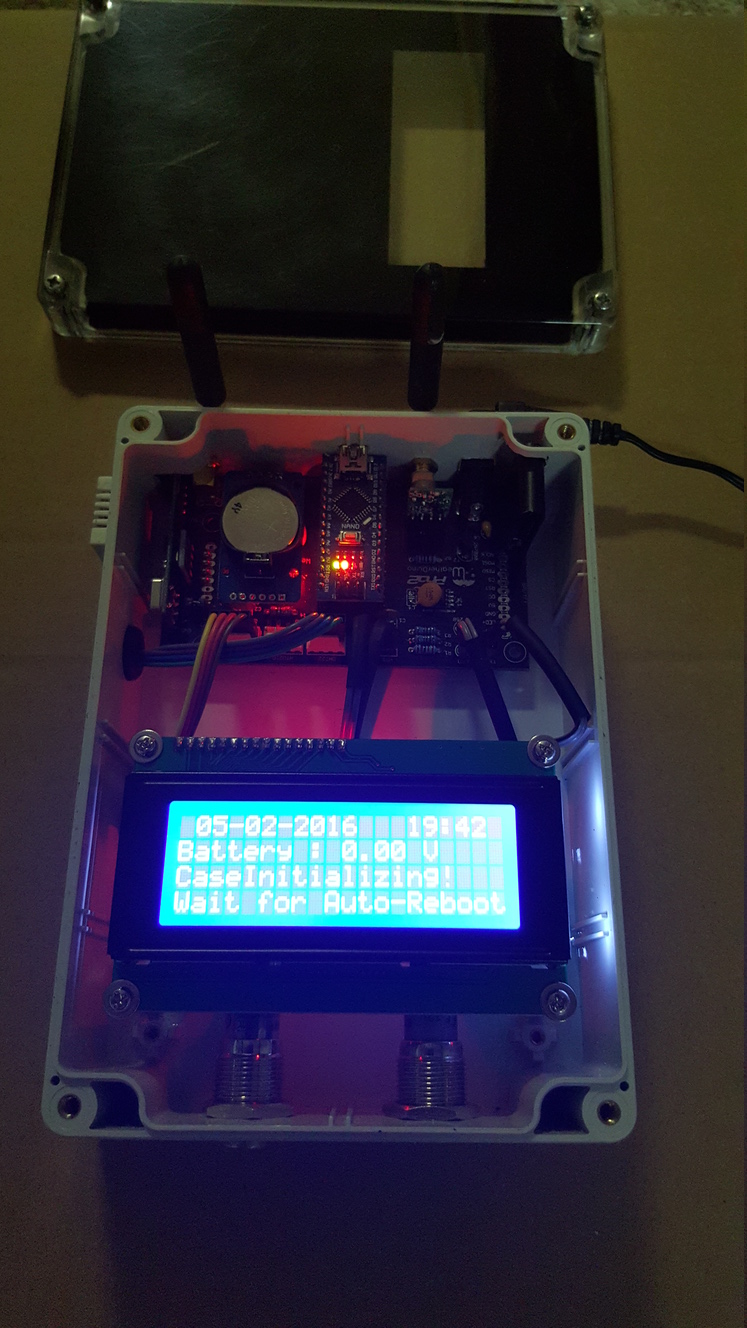
Alas, I got characters coming up on the display.

I played around with various config switches to show other information and also to set the RTC with the compile time (thank you Werk) {another note to self, remember to take this out of the code as restarts keep setting it back to the compile time}.

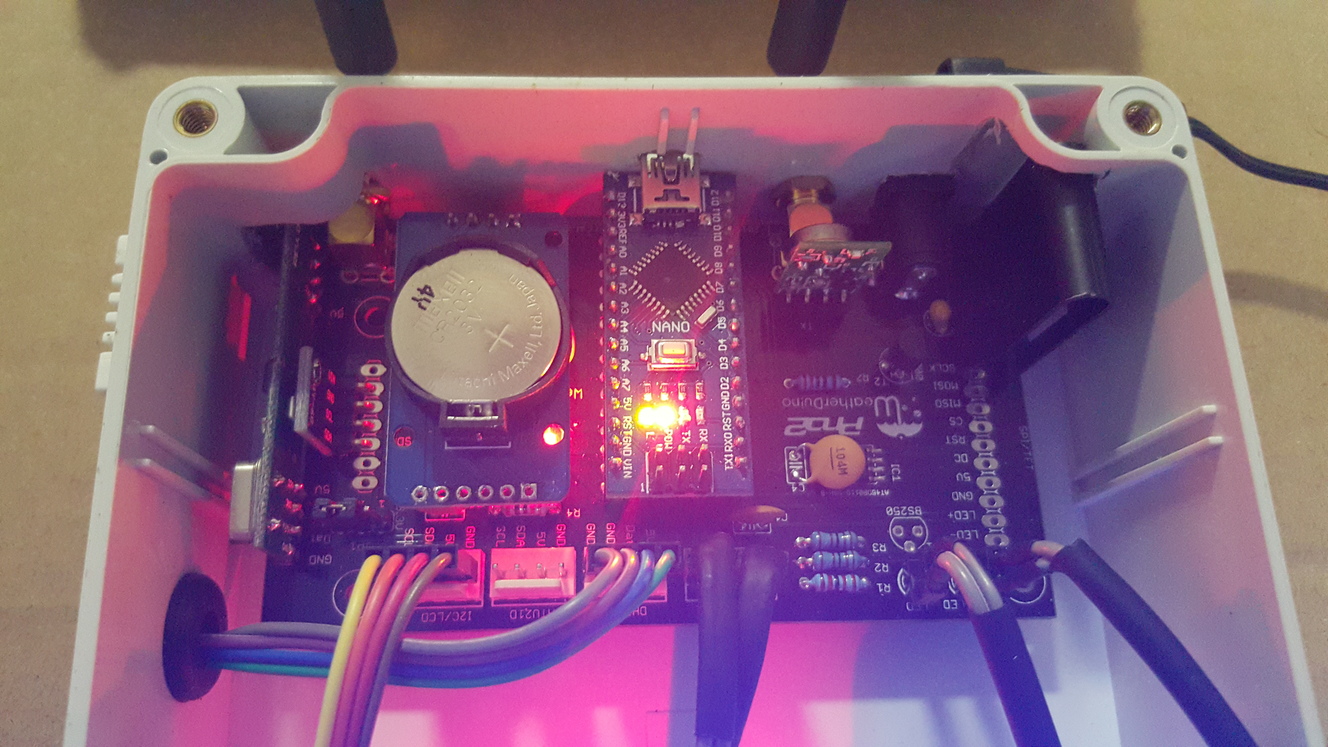
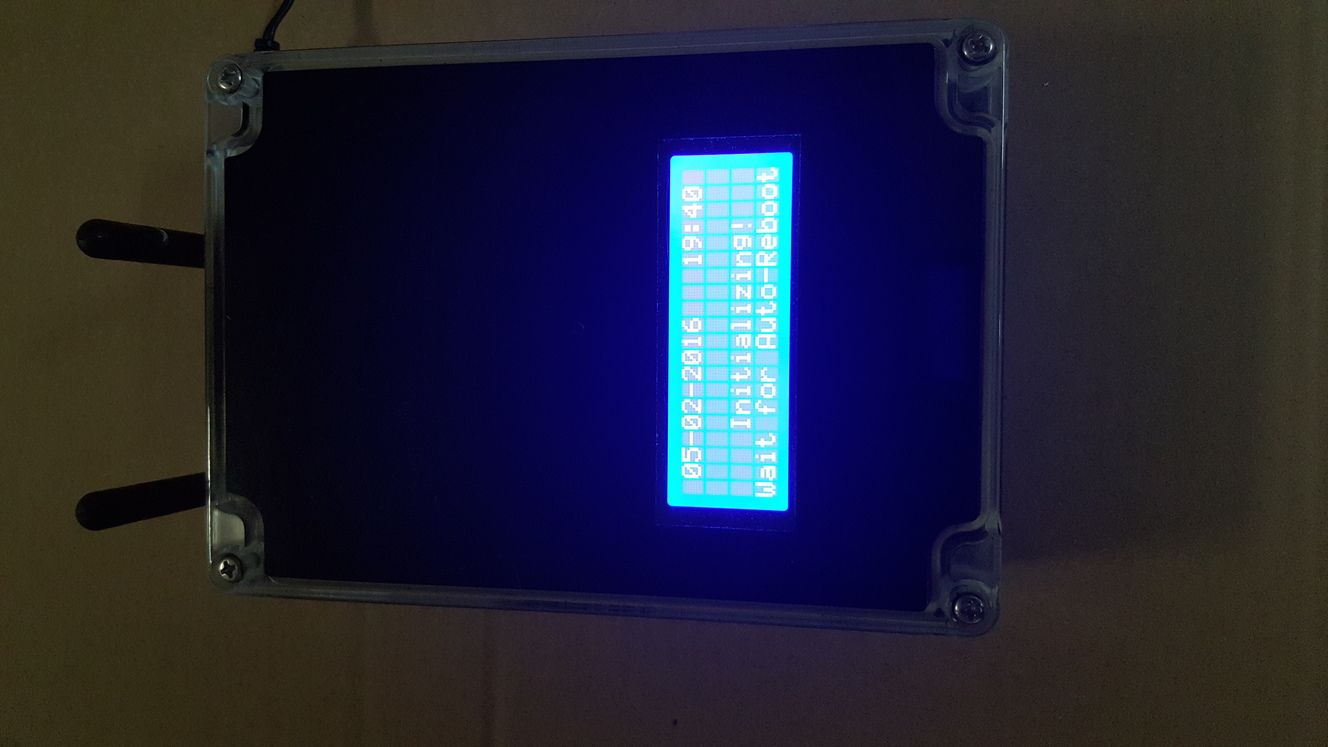
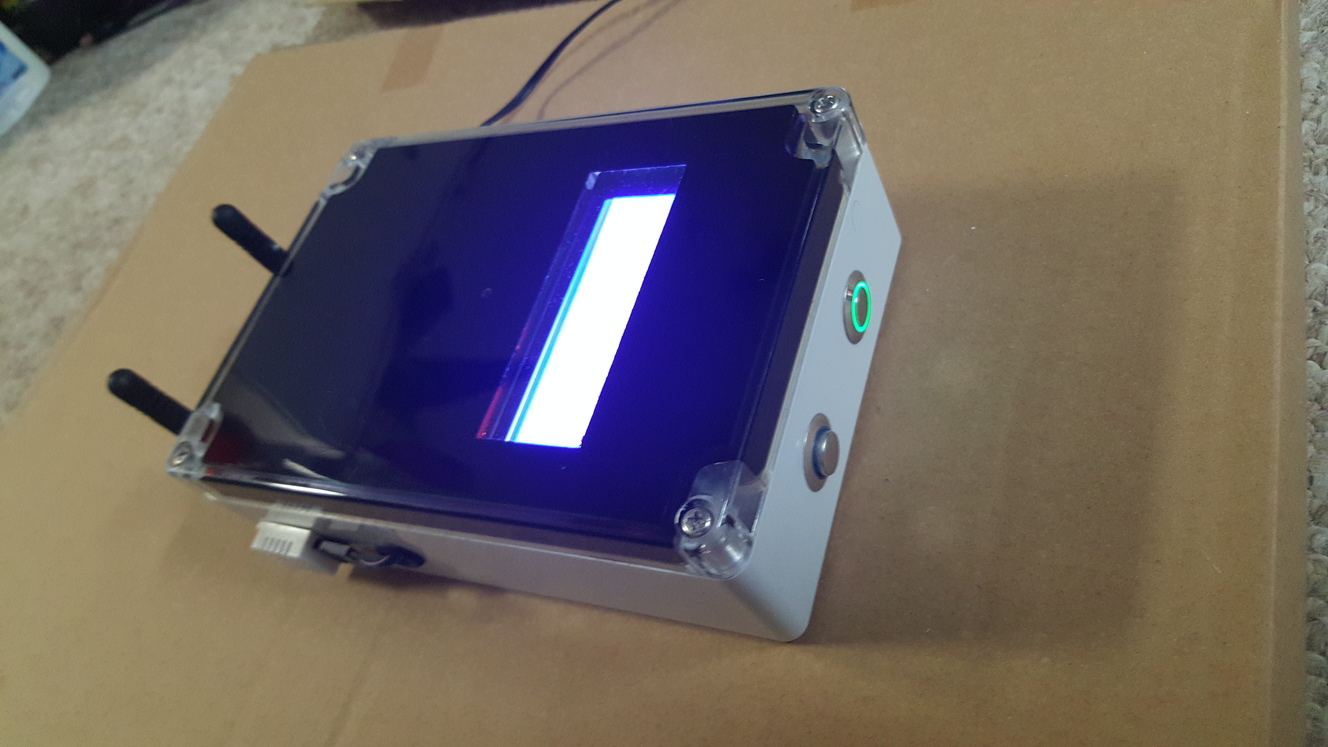
I then "borrowed" other members ideas and decided to put the RX into a nice case. So that I could mark it up and keep the surfaces from being scratched I covered all surfaces in clear packaging tape. {another note to self, never ever do this again, as the adhesive started to react and required more work than what it was worth to clean}. I am still in the process of running various polishing compounds to get back to a nice shiny lid. {another note to self, don't just grab that cleaning rag out of the garage, probably contains fine grit in it}

So currently I have an RX unit that appears nice, a TX unit that sits naked at the moment, while I try and get communications working happily between the two. I tried scanning the forums for the required distance between the units so that I wasn't overdriving the signal, suffice to say I started with my units about 3 - 4 metres apart, with fingers crossed.

Well I think they decided that communication was to be my next challenge, as leaving them alone nothing updates on the RX unit and yes my TX is happily sending out a flash about every 20 seconds {not timed, just a guess}.

I ran up a little bit of decoding on the RX unit after checking that I had both TX and RX set to station 1A (decimal 161) and the RX tells me that it is getting decimal 82. It doesn't matter how I manipulate that binary there is no pattern.

So, rather than keep on raving on, I'm going to upload some pictures { I think I can see how} and take a break as I have yet another weekend of volunteering, just what I need after a almost a 60 hours of paid work and that was only since Monday.
               
Reply
#2

Hey grunge, that all looks awesome. Nice work. I'm just about to start building my station, and had also been waiting (well actually still waiting) for parts to come from OS out of eBay. I'm also in Brissy, so maybe we can lean on each other though this build and then onto the running and tweaking of our systems over time and ongoing. I'm still looking for sensors - have you found anything in Brissy....? I like how you did your Rx enclosure, and had still been considering various ideas. Luv to hear any more pros or cons that you came across already (other than above)... Anyhow, looking great, and chat you soon.
Mark R
Reply
#3

Hi

First of all thanks for the pictures. The RX assembly looks really good.


Quote:The RX board fired up, but no display, hmmm, start learning again, start simple and keep simple. Well a few late nights and a couple of days later, a thought dropped after scanning the forum and swatting up on all I could, what's that utilities directory I saw and when installing the Arduino files. I2C_Scanner, never using I2C before a quick google helped here. After running it up and find out that when I removed the 20x4 LCD the address 3F disappeared {note to self, remember there was a reference to this in one of the forums}.

Most of the I2C LCD modules are sold pre-configured at address 0x27, but there are exceptions... I'm thinking add in the next software release, a new user configurable option to allow an easy definition of the LCD I2C address.

Quote:I played around with various config switches to show other information and also to set the RTC with the compile time (thank you Werk) {another note to self, remember to take this out of the code as restarts keep setting it back to the compile time}.

The described procedure can be used, but during the initial tests there is no need to be worry about the date and time displayed on the LCD. The hardware RTC clock will automatically sync with the PC clock when you start Cumulus.


Quote:So currently I have an RX unit that appears nice, a TX unit that sits naked at the moment, while I try and get communications working happily between the two. I tried scanning the forums for the required distance between the units so that I wasn't overdriving the signal, suffice to say I started with my units about 3 - 4 metres apart, with fingers crossed.

Well I think they decided that communication was to be my next challenge, as leaving them alone nothing updates on the RX unit and yes my TX is happily sending out a flash about every 20 seconds {not timed, just a guess}.

I ran up a little bit of decoding on the RX unit after checking that I had both TX and RX set to station 1A (decimal 161) and the RX tells me that it is getting decimal 82. It doesn't matter how I manipulate that binary there is no pattern.

Please attach both Config_RX.h and Config_TX.h files and tell me which type of outside temp / hum sensor you are planning to use. SHT1x or SHT2X?

Just for testing purposes, try to run the RX unit this this setting (see Config_RX):

Code:
// ---- Test Mode ON/OFF
#define TestMode    true   //

When this setting is set to false, the RX units never leaves the initialization phase, until it receives valid signals from three of the external sensors (temp /hum, wind, rain) which seems is not happen now.

Reply
#4

(05-02-2016, 12:51)Wizza Wrote:  Hey grunge, that all looks awesome. Nice work. I'm just about to start building my station, and had also been waiting (well actually still waiting) for parts to come from OS out of eBay. I'm also in Brissy, so maybe we can lean on each other though this build and then onto the running and tweaking of our systems over time and ongoing. I'm still looking for sensors - have you found anything in Brissy....? I like how you did your Rx enclosure, and had still been considering various ideas. Luv to hear any more pros or cons that you came across already (other than above)... Anyhow, looking great, and chat you soon.
Mark R

Hi Mark,
No problems happy to try and help.
Pros
- Werk_AG & Uncle_bob have put a lot into getting the message out their.
- The professionalism of the circuit boards is also a tribute to Werk, it makes it so much easier.

Cons
- me, "teaching an old dog new tricks", electronics and coding has changed a lot since assembler and wire wrapping
- eBay suppliers, I have found they come and disappear overnight and you take the gamble, so far so good.

As for sensors, I mainly use eBay as the prices are so cheap, and I couldn't even try to build some for that price.

Graham

A picture of my naked TX unit
   

Quote:First of all thanks for the pictures. The RX assembly looks really good.

Thank you, I wanted to make sure that if such great effort went into the circuit board and code then the least I could do was to wrap it nicely.


Quote:Most of the I2C LCD modules are sold pre-configured at address 0x27, but there are exceptions... I'm thinking add in the next software release, a new user configurable option to allow an easy definition of the LCD I2C address.

Yes a little gotcha, but it's par for the learning.

Quote:The described procedure can be used, but during the initial tests there is no need to be worry about the date and time displayed on the LCD. The hardware RTC clock will automatically sync with the PC clock when you start Cumulus.

I have installed Cumulus on my RaspberryPi, but never been run and I need to teach myself about the website templates, so I thought of getting this running before tackling and debugging there.

Quote:Please attach both Config_RX.h and Config_TX.h files and tell me which type of outside temp / hum sensor you are planning to use. SHT1x or SHT2X?

At this stage I will be using the SHT22, it's currently connected just for testing.

Quote:Just for testing purposes, try to run the RX unit this this setting (see Config_RX):

Code:
// ---- Test Mode ON/OFF
#define TestMode    true   //

Yep, I went through that step, apologies I didn't write this up and I was able to see temperature and humidity on the LCD.

Quote:When this setting is set to false, the RX units never leaves the initialization phase, until it receives valid signals from three of the external sensors (temp /hum, wind, rain) which seems is not happen now.

Ah!, now this sounds like my "gotcha". My old weather system "FO" died last year, hence going down this path, so I haven't climbed back up on roof to recover the sensors. I had only configured ID0 and ID5 at this stage. I could probably mock these up just for testing.

Graham

Having difficulty attaching configs, so I will copy here

Config_TX
Code:
// --------------------------------------------------------------------------------------
//   User configurable options
// --------------------------------------------------------------------------------------
#define StationID  0xA1    // Must be equal to your RX Unit (Value from 0x00 to 0xFF)  
#define UnitID        0    // If you use only one TX unit define it as UnitID = 0
                           // For a second TX unit, define it as UnitID = 1

// -------  Define type of Temperature Humidity for Sensor 0 and Sensor 1 --------------
#define TH_Sensor0  9      // 0 for SHT2x sensor, 1 for HTU21 sensor, 9 for Not Used
#define TH_Sensor1  1      // 0 for SHT1x sensor, 1 for DHT22 sensor, 9 for Not Used

// -------  Let's define the data we want to send --------------------
#define ID0      // Temp/Hum Data
//#define ID1      // Not Used
//#define ID2      // Wind data
//#define ID3      // Rain data
//#define ID4      // UV / SolRad data
#define ID5      // Hardware Status - System Temp, Battery Voltage etc

#define FanControlSensor  1      // 0 for Sensor 0, 1 for Sensor 1 (which sensor is used to control the RS Fan)
#define fanOn_HiTemp     30      // RS Fan turn on when outside temperature is >= than this value (ºC)
#define fanOn_LowTemp     2      // RS Fan turn on when outside temperature is <= than this value (ºC)
#define fanOn_LowWind     2      // RS Fan turn on when Wind Average is <= than this value (m/s)

// ------- Define type of Wind Speed sensor
/*
--- Fine Offset Anemometers ---
Use 1O for standard FO anemometers
Use 11 for FO anemometer modified with 1 hall effect sensor

--- Inspeed Anemometers ---
Use 20 for Inspeed Vortex, digital 8 pulse revolution anemometer
Use 21 for Inspeed Vortex, hall efect sensor
Use 21 for Inspeed Vortex, read switch sensor

--- Davis Anemometers ---
Use 30 for Davis 6410 anemometer

--- Novalynx Anemometers ---
Use 40 for Novalynx, model 200-WS-02F

--- Environmental Measurements Limited ---
Use 50 for EML, model WSD1

--- Didcot Instrument Company ---
Use 60 for DIDCOT, model DWR205
*/
#define WSpeedSensor_Type 10  // SEE INFO ABOVE!!!

// ------- Define type of Wind Direction sensor
/*
--- Fine Offset Wind Vane ---
Use 1O for standard FO wind vane

--- Inspeed Wind Vane ---
Use 20 for Inspeed E-Vane 2

--- Davis Wind Vane ---
Use 30 for Davis 6410 wind vane

--- Novalynx Wind Vane
Use 40 for Novalynx, model 200-WS-02F

--- Environmental Measurements Limited Wind Vane ---
Use 50 for EML, model model WSD1

   --- Didcot Instrument Company ---
Use 60 for DIDCOT, model DWD205
*/
#define WDirSensor_Type  10  // SEE INFO ABOVE!!!

// ------------- Inspeed Vane Calibration ----------------------
// ------- Calibration values for Inspeed E-Vane 2
#define WDir_min         60
#define WDir_max        990
#define WDir_offs         0

// ------- Define Rain Gauge tip boucket
/*
  Use 0.300 for standard FineOfset rain gauges (Datasheet value = 0.2794)
  Use 0.200 for standard Davis rain gauges
*/  
#define COLLECTOR_TYPE  0.300  // Please note: Values must be in metric units. Max. resolution: 3 decimal digits
  

// ---------------------------------------------------------------------------------------------------
//     End of user configurable options
// ---------------------------------------------------------------------------------------------------

Config_RX
Code:
// --------------------------------------------------------------------------------------
//   User configurable options
// --------------------------------------------------------------------------------------

#define Station_ID     0xA1   // Station_ID, use the same value in all TX units
#define Relay_ID       0xA3   // Relay_ID,   use the same value in all WD units

// --- Define Software Operation Mode
#define Work_Mode         0   // Mode 0= Davis VP2 Emulation Mode, Mode 1= EasyWeather Mode

// --- Define your Display type
// --- Chosing TFT automatically disables the data logger function (no memory for both)
#define DisplayType       1   // 0= TFT, 1= LCD 20x4, 2= LCD 16x2

// --- Define Backlight TimeOut
// --- With old RX boards, version <= 3.01 always set this value to 0
const byte  BackLight_Timeout = 15;   // Timeout for display backlight in minutes (1 to 255). 0 = Always ON

// --- Define Display unit Formats --------------------------------------------
#define Date_Time_Format    0    // 0 for dd-mm-yyyy, 1 for yyyy/mm/dd
#define Temp_Display_Unit   0    // 0 for ºC, 1 for ºF
#define ATM_Display_Unit    0    // 0 for mBar, 1 for inHg
#define Rain_Display_Unit   0    // 0 for mm (no other options)
#define Wind_Display_Unit   0    // 0 for Km/h, 1 for mph, 2 for m/s, 3 for Knots

// --- Fine adjusts for Inside Temperature and Barometer
const int   TemperaturaInt_offset =    0;   // Inside Temperature Fine Adjust in Tenths of Degree (-4 = -0,4ºC)
const float pressure_offset       = -1.0;   // Pressure Fine Adjust in mB

// --- Some Data from your Weather Station location
#define LATITUDE      -27    // Put here your Station latitude in tenths of degrees North
#define LONGITUDE     152    // Put here your Station longitude in tenths of degrees (minus for West)
#define ELEVATION      42    // Put here your Station height above sea level in Meters

// --- Define Roll Over Hour for Meteorological Day
#define MeteoDay_HStart 9    // Use values from 0 to 23

// --- Define Wind Speed and Wind Gust resolution
#define VP2_WindRes     2    // If set to 2, set Cumulus Wind Speed and Wind Gust multipliers to 0.448. Wind Resolution 0.72 Km/h
                             // If set to 1, set Cumulus Wind Speed and Wind Gust multipliers to 0.224. Wind Resolution 0.36 Km/h
                             // WARNING !!! Setting this variable to 1 allows a better wind speed and gust resolution,
                             // but also limits both of them, to a maximum reading of just 91.8 Km/h
                             // This setting only have effect when the software is used in Davis VP2 emulation mode
                             // If set to 0, system uses Standard Davis 1 mph wind resolution.
  
// --- Define the type of your inside Temperature / Humidity Sensor
#define InsideTH_Sensor  0   // 0= DHT22, 1= HTU21D

// ---- Lets define the source or type of our main outside sensors
// ---- If you have all the sensors connected to only one TX board, always select Unit 0 as source
// ---- Define the source of your main Temperature / Humidity sensor
#define TH_OutUnit       0   // 0 for Temp/Hum sensor connected to TX_Unit 0, 1 for Temp/Hum sensor connected to TX_Unit 1
// --- Define your main outside Temperature / Humidity Sensor
#define MainOutTH_Sensor 1   // 0 for sensor type SHT21 or HTU21D, 1 for sensor type SHT1x or DHT22
// ---- Define the source of your Main Wind sensor
#define WIND_OutUnit     0   // 0 for Wind instruments connected to TX_Unit 0, 1 for TX_Unit 1
// ---- Define the source of your main Rain Gauge
#define RAIN_OutUnit     0   // 0 for Rain Gauge connected to TX_Unit 0, 1 for TX_Unit 1, 2 for Auriol RF Rain Gauge
// ---- Define the source of your main Solar / UV sensores
#define SRUV_OutUnit     0   // 0 for Solar Rad / UV sensors connected to TX_Unit 0, 1 for TX_Unit1, 9 for not used
// ---- Define installed Solar / UV Sensors
#define Solar_Sensor     0   // 0 for not present; 1 for present
#define UV_Sensor        0   // 0 for not present; 1 for present


// ---- Extra Sensors Mapping
// ---- Define the TX source and sensor number of each of the five extra sensors, insert 9 if not used.
// ---- Sensor number 0 is for type SHT21 or HTU21D. Sensor number 1 is for type SHT1x or DHT22
// ---- First field = TX unit number, Second field = Sensor number (0 or 1) in the TX unit
// ---- Example: {0,1} - First extra sensor, is sensor 1 from TX unit0
//               {1,0} - Second extra sensor, is sensor 0 from TX unit1            
#define ExtraSensors { {9,9},{9,9},{9,9},{9,9},{9,9} }


// ---- Broadacasting Data Settings
#define Relay_Data       1   // 0= Disables Data Relay, 1= Enables Data Relay

// ---- Data Logger Settings
#define Logger_Enable    1   // 0= Disable 1= Enable
byte ARCHIVE_PERIOD  =   5;  // Default Archive Period in Minutes (Usable values: 1, 5, 10, 15, 30, 60 or 120)

// ---- Define your RX board main version number
#define Board_Version    5   // ex: 5 for all RX boards v5.xx, 4 for RX board v4.xx or lower

// ---- Test Mode ON/OFF
#define TestMode    false   //

// ---------------------------------------------------------------------------------------------------
//     End of user configurable options
// ---------------------------------------------------------------------------------------------------
Reply
#5

Hi Graham

From what I read, I'm sure you are in the right direction and both units are working. Your "gotchas" just lead you to know more about how the system works Smile

Quote:At this stage I will be using the SHT22, it's currently connected just for testing.

For this sensor, please make this changes:

Config_TX.h

Code:
// -------  Define type of Temperature Humidity for Sensor 0 and Sensor 1 --------------
#define TH_Sensor0  0      // 0 for SHT2x sensor, 1 for HTU21 sensor, 9 for Not Used
#define TH_Sensor1  9      // 0 for SHT1x sensor, 1 for DHT22 sensor, 9 for Not Used

Config_RX.h

Code:
// ---- Lets define the source or type of our main outside sensors
// ---- If you have all the sensors connected to only one TX board, always select Unit 0 as source
// ---- Define the source of your main Temperature / Humidity sensor
#define TH_OutUnit       0   // 0 for Temp/Hum sensor connected to TX_Unit 0, 1 for Temp/Hum sensor connected to TX_Unit 1
// --- Define your main outside Temperature / Humidity Sensor
#define MainOutTH_Sensor 0   // 0 for sensor type SHT21 or HTU21D, 1 for sensor type SHT1x or DHT22


Quote:I had only configured ID0 and ID5 at this stage. I could probably mock these up just for testing.

When you said that the TX Led is blinking more or less at 20 sec intervals, I thought something like that.

At this point, you can continue testing your RX and TX units, even without the wind sensor and rain gauge attached to the TX unit.
At least activate ID0, ID2 and ID3, and the RX unit will happily pass the initialization phase, without having to run it in test mode.

Reply
#6

(05-02-2016, 12:51)Wizza Wrote:  I'm still looking for sensors - have you found anything in Brissy....?

If you are outstanding wind and rain sensors, I purchased my replacement "Fine Offset" rain sensor from http://stores.ebay.com.au/ozweathercenter/
based in Taringa. Still paid for postage however locally very quick.
Mark.

Reply
#7

Thanks Mark. I'll check them out...
Reply
#8

(05-02-2016, 19:07)Werk_AG Wrote:  First of all thanks for the pictures. The RX assembly looks really good.


+1 Fantastic looking job there.

It seems you have you head around all this very well.
Good luck, looking forward to seeing your station online!
Cheers UB
Reply
#9

Slowly getting there, I found out that my antenna was not making connection with the center pin of the SNA connector in the TX unit. Currently, I now have a piece of hookup wire that is acting as a great antenna. Data coming through to RX unit as I get the battery voltage, now to debug it as it has been sitting for the last few hours with "Wait for Auto-Reboot".

I'll troll through the forums :-)
Reply
#10

(19-02-2016, 04:44)grunge Wrote:  ...it has been sitting for the last few hours with "Wait for Auto-Reboot".

I'll troll through the forums :-)

Just read some posts above...
http://www.meteocercal.info/forum/Thread...22#pid3422
Quote:At least activate ID0, ID2 and ID3, and the RX unit will happily pass the initialization phase, without having to run it in test mode.


If after a power up the RX unit stay more than a few minutes in "Wait for Auto-Reboot" or "Don't connect weather software yet" the most probable cause is because it is not receiving Temp / Hum, Wind and rain data from the TX unit.
Even if you haven't those sensors connected to the TX unit, at least on the TX software enable the sending for those type of data.
When using just one TX unit, ID0, ID2 and ID3 must not be commented.

Reply


Users browsing this thread: 1 Guest(s)