Thread Rating:
  • 0 Vote(s) - 0 Average
  • 1
  • 2
  • 3
  • 4
  • 5

Rx Board won't connect to Cumulus
#1

Hi All,

I've just completed the build of both the Tx and Rx boards. Both are now working well with all readings expected on the 20x4 LCD display.

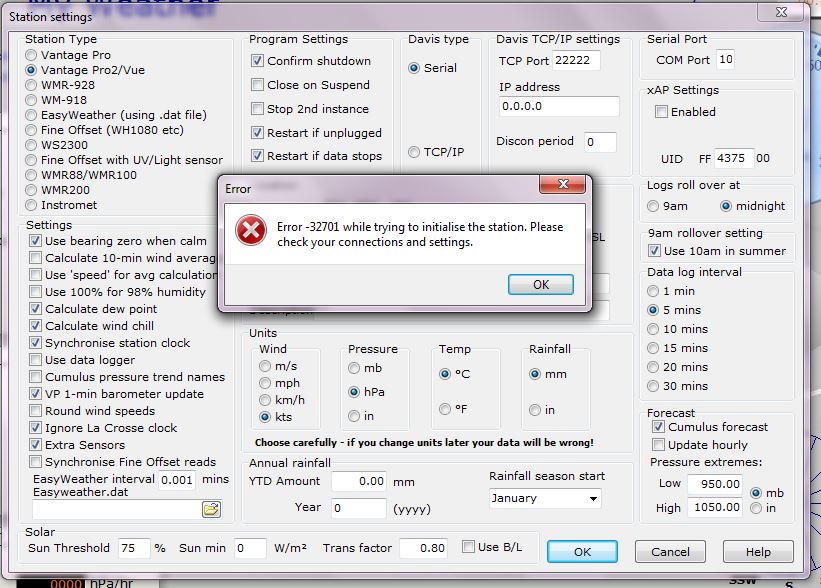
However, I am unable to get Cumulus to connect to the Rx unit. I have set up the Cumulus software as described on this forum with the serial port number set to the number I see the Arduino nano on in Windows Device Manager. However when I press OK in the Cumulus station settings window, the Rx nano reboots and after 30 seconds I get the following message:

"Error -32701 while trying to initialise the station. Please check your connections and settings"

I've attached a screenshot of the message. I know the serial port works, as I have programmed the Arduino through it!

Any ideas would be much appreciated.

Zak
   
Reply
#2

Hi, Zak

First of all, congratulations for having built the system very quickly.

The issue you describe, can happen for two reasons:
The first one, and I bet on this: After programing Arduino, and before starting Cumulus, you forget to close the VP1 switch.
Second one: Even with VP1 on close position, after a restart, you must wait 2 to 3 minutes before attempting to connect Cumulus.

Everytime you need to reprogram the Arduino, you must revert VP1 switch to open position, and after programing close it again.

Please report back.
Do you have any pictures of your system?

Reply
#3
Smile 

Many thanks for that..... you are of course right, I had forgotten to close the VP1 switch. Out of interest, does VP1 = Virtual Port 1? Apart from this error, everything worked first time.

I'll post some photos later tonight. I was building for a while yesterday and need to go out and get some fresh air today Smile

Thanks again for a great design.

Zak


(22-02-2015, 02:23)Werk_AG Wrote:  Hi, Zak

First of all, congratulations for having built the system very quickly.

The issue you describe, can happen for two reasons:
The first one, and I bet on this: After programing Arduino, and before starting Cumulus, you forget to close the VP1 switch.
Second one: Even with VP1 on close position, after a restart, you must wait 2 to 3 minutes before attempting to connect Cumulus.

Everytime you need to reprogram the Arduino, you must revert VP1 switch to open position, and after programing close it again.

Please report back.
Do you have any pictures of your system?
Reply
#4

I also thank you for trusting in the WeatherDuino Pro 2 system. I hope, your new weather station gives you pleasure and reliable weather data for long time.

If you intend put it online and wish to share the link with us, free feel to do it.

Reply
#5

(22-02-2015, 21:06)Werk_AG Wrote:  I also thank you for trusting in the WeatherDuino Pro 2 system. I hope, your new weather station gives you pleasure and reliable weather data for long time.

If you intend put it online and wish to share the link with us, free feel to do it.

Hello Werk_AG,

As requested, attached are images of my recently completed Tx and Rx boards. I've yet to finish the WD board as one of the Arduino Nano modules I ordered was faulty and wouldn't program.

I'm moving on to casing them all up this week and I'll share the photos of this when they're finished.

I'm not sure how to embed pictures in my posts at a larger size yet so I've just added the images as attachments. Could you let me know how to do this? When I click on the insert image icon it asks for a URL rather than a file name. I must be missing something....

I will be putting the station on the web when it's complete and will be more than happy to share the link.

Rgds,

Zak


Reply
#6

Hi, Zak

Thanks for the pictures of the boards, they are far better than mine Cool.

Quote:I'm not sure how to embed pictures in my posts at a larger size yet so I've just added the images as attachments. Could you let me know how to do this? When I click on the insert image icon it asks for a URL rather than a file name. I must be missing something....

Just upload your images to any web server (your own, or another like picasa) and insert the image, giving the URL of it.

Quote:I will be putting the station on the web when it's complete and will be more than happy to share the link.

It seems that the WeatherDuino Weather Stations - Worldwide Users Map will grow soon Smile

Reply
#7

(24-02-2015, 02:57)Werk_AG Wrote:  Hi, Zak

Thanks for the pictures of the boards, they are far better than mine Cool.

Too right, nice looking boards right there.
Reply
#8

Thanks for the compliments!

The building is the easy bit though, the clever bit is the design!

(24-02-2015, 03:02)uncle_bob Wrote:  
(24-02-2015, 02:57)Werk_AG Wrote:  Hi, Zak

Thanks for the pictures of the boards, they are far better than mine Cool.

Too right, nice looking boards right there.
Reply
#9

(24-02-2015, 23:35)Zack_ster Wrote:  The building is the easy bit though, the clever bit is the design!

Yes indeed. Werk_AG has done fantastic work with this system!
Reply


Users browsing this thread: 1 Guest(s)