


29-12-2020, 04:39
Hi,
I would like to help, but i need more specific info.
Try enabling the
removing the two "//" on that line.
you may have to remove the "//" on those two lines too
lines 122 and 123 at NET tab
Compile and upload.
Then, what you get on the serial monitor? It should output something when it tries to send data to WU.
If it isn't receiving data from the rain gauge, how the system initialize after a reboot or after programming it? At startup if it don't get data from the Rain Gauge, it will stay forever on the "gathering data from sensors" screen, unless you are running it in TEST mode. However, if it is running in TEST mode, then the WU upload function will not run (this is to prevent sending wrong or incomplete data to WU).
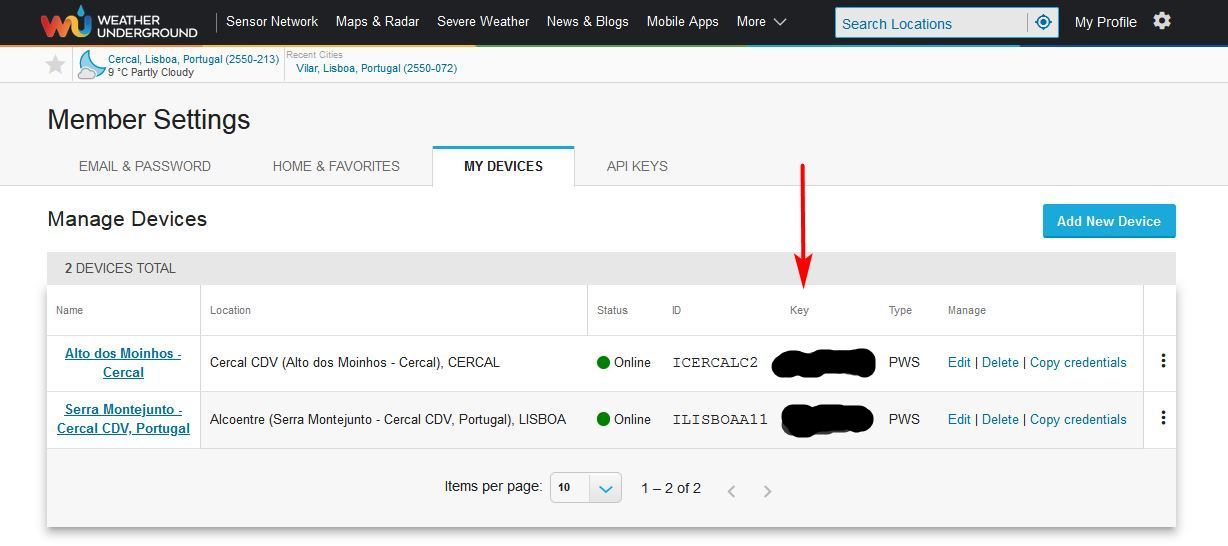
Just to be sure, this is the WU key you need to use:
I would like to help, but i need more specific info.
Try enabling the
Code:
//#define PRINT_DEBUG_WU_UPLOADremoving the two "//" on that line.
you may have to remove the "//" on those two lines too
lines 122 and 123 at NET tab
Code:
//time_t UTC_time = myTZ.toUTC(now());
//sprintf(dateutc, "%d-%02d-%02d+%02d%%3A%02d%%3A%02d", year(UTC_time), month(UTC_time), day(UTC_time), hour(UTC_time), minute(UTC_time), second(UTC_time));
Compile and upload.
Then, what you get on the serial monitor? It should output something when it tries to send data to WU.
If it isn't receiving data from the rain gauge, how the system initialize after a reboot or after programming it? At startup if it don't get data from the Rain Gauge, it will stay forever on the "gathering data from sensors" screen, unless you are running it in TEST mode. However, if it is running in TEST mode, then the WU upload function will not run (this is to prevent sending wrong or incomplete data to WU).
Just to be sure, this is the WU key you need to use: